
Resources to help you feel more confident and informed about keeping children and young people safe online. What to do, what to look out for, and how to keep the virtual world a safe place.
On this page
- Talking to your child about internet safety
- Resources for children with Special Educational Needs and Disabilities
- Apps
- Smart toys and gadgets
- Cyberbullying
- New friends online
- Body image, filtering and selfies
- Live-streaming
- Fake news, and what is an influencer?
- Parental controls
- Gaming guides
- Parents guide: Talking to your child about online sexual harassment
- Sexting, sharing nudes and semi-nudes
- Pornography
Talking to your child about internet safety
Talking regularly with your child is the best way to help keep them safe online, regularly speaking to them and making it part of daily conversation, like you would about their day at school. This will help your child feel relaxed and listened too, get to know the games they enjoy playing and the apps that they have downloaded. Talking regularly means that you are showing an interest in what is important to them and when they do have any worries, they’re more likely to come and speak to you.
For helpful information and tips for starting the conversation, go to Teaching Your Child about Internet & Online Safety (NSPCC)
The 4 C's of online safety
As the technology continues to evolve, so do the risks that children and young people face online. You many have heard about the 4 Cs at from your child's school. It is a good framework to refer to, for online safety.
Content
Being exposed to illegal, inappropriate, or harmful content, for example:
- pornography
- fake news
- racism
- misogyny
- self-harm
- suicide
- anti-Semitism
- radicalisation
- extremism
Contact
Being subjected to harmful online interaction with other
users, for example:
- peer to peer pressure
- commercial advertising
- adults posing as children
- young adults with the intention to groom or exploit them
Conduct
Online behaviour that increases the likelihood of, or causes, harm, for example:
- making, sending and receiving explicit images
- online bullying
Commerce
Risks such as online gambling, inappropriate advertising, phishing and or financial scams. If you feel your pupils, students or staff are at risk, please report it to Report a scam email - NCSC.GOV.UK
Download The 4 C's of online safety, poster [PDF]
Parent guides
The National College has great resource and guides around various areas of the digital world, for example, Online Slang (The National College) [PDF]
Further guides include, YouTube, Under fives safety online and managing screen time. Visit Parent Guides Library (The National College)
Resources for children with Special Educational Needs and Disabilities
Every child and young person regardless of their special need or disability will want to experience online world, but there are some online risks that children with SEND may be more likely to experience. Internet Matter.org have produced parent and carer guides to support with making your child's online world a safe one.
Learn more about supporting children with SEND online in this 1-mintue video produced by Internet Matter.org
For more information, go to Supporting children and young with SEND online (Internet Matters)
For further information and support visit
- Keeping children safe online (NSPCC)
- Getting Started (Childnet)
- Connecting and Sharing (internetmatters.org)

Apps
The word "app" is an abbreviation for "application." It's a piece of software that comes pre-installed on your device, or it's software that you install on the device.
App is most often used in reference to a mobile app, and our smart phones are full of them we use them constantly. But how do we know what app's are appropriate for our children? And What age can children start social networking?
Intermatters.org have a useful advice to age ratings, to find out more go to, What age can my child start social networking? (Internet Matters)
Smart toys and gadgets

These days, children grow up with technology all around them, and using a smart phone or a smart toy is part of normal life and has become second nature.
Understanding what connects to the internet and what happens to our information on those devices is important to consider when choosing these types of toys.
The website, Internet Matters, has information on choosing the right tech, including guides on setting up your kid's tech and smart toy buying guide.
Visit Tech guide: buyer's guide for parents (Internet Matters)
They have also created this handy poster to refer to.
Download Buying a smart toy poster [PDF] (Internet Matters)
Cyberbullying
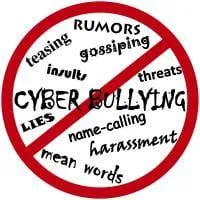
What is cyberbullying?
- Bullying that takes place on digital devices
- Includes sending, posting or sharing negative, harmful, false or mean content about someone else
- May include sharing personal and/or private information – intention is to cause embarrassment and humiliation
Cyberbullying may include:
- Threats
- Hacking
- Manipulation
- Exclusion
- Prejudice
- Stalking
- Public postings
For further information and support, visit:
- Online bullying (anti-bullyingalliance.org.uk)
- Stop Speak Support Anti-Cyberbullying Day (anti-bullyingalliance.org.uk)
- Cyberbullying: What is it and how to stop it (UNICEF)
- Bullying and cyberbullying (Childline)
- Helping Children Deal with Bullying & Cyberbullying (NSPCC)
- Cyberbullying (Family Lives)
- Cyberbullying, Advice for parents (Internet Matters)
New friends online
Making new friends online is something that children and young people do quick naturally while gaming, however, they do not always think before chatting to new people online, that this can potentially make them vulnerable to bullying, inappropriate friendships and grooming.
Grooming is when someone builds a relationship, trust and emotional connection with a child or young person so they can manipulate, exploit or abuse them.
Children and young people who are groomed can be sexually abused, exploited or trafficked.
Anybody can be a groomer, regardless of their age, gender or race. It can be easier online because the groomer can hide their identity.
Signs of grooming
It can be difficult to tell if a child is being groomed, the signs aren't always obvious and may be hidden. Older children might behave in a way that seems to be "normal" teenage behaviour, masking underlying problems.
Some of the signs you might see include:
- being very secretive about how they're spending their time, including when online
- having an older boyfriend or girlfriend
- having money or new things like clothes and mobile phones that they can't or won't explain
- underage drinking or drug taking
- spending more or less time online or on their devices
- being upset, withdrawn or distressed
- sexualised behaviour, language or an understanding of sex that's not appropriate for their age
- spending more time away from home or going missing for periods of time.
Grooming and Radicalisation
There’s a chance that a child may meet people online or visit websites that could lead them to adopting what may be considered as extreme views, and becoming radicalised.
Curiosity can lead children to seek out these people, or they could be befriended by someone in order to encourage them to adopt beliefs or persuade them to join groups whose views and actions could be considered extreme.
Signs of radicalisation
Radicalisation can be really difficult to spot.
Signs that may indicate a child is being radicalised include:
- isolating themselves from family and friends
- talking as if from a scripted speech
- unwillingness or inability to discuss their views
- a sudden disrespectful attitude towards others
- increased levels of anger
- increased secretiveness, especially around internet use.
Children who are at risk of radicalisation may have low self-esteem, or be victims of bullying or discrimination. Extremists might target them and tell them they can be part of something special, later brainwashing them into cutting themselves off from their friends and family.
Tips for how to talk to children about online friendships
- Talk about who they're friends with online, how they choose their friends and what they share. People aren't always who they say they are.
- Talk to older children about healthy relationships and encourage them to think about what sites they visit and what they share.
- Let the child know that they can talk to you, or another adult they trust, if something is worrying them.
- Talk about the privacy settings on their social networking profiles and agree a privacy setting that you're both comfortable with. Remember, the higher the privacy, the safer your child is.
- Show the child what strangers can see by searching for their name when you're not logged in.
- If you have young children playing online, switch off the social and chat features.
- If you're concerned about someone's behaviour towards children, you can report this to the Child Exploitation and Online Protection (CEOP) or, in an emergency, dial 999.
For more information, visit:
- What Parents Need to Know About Sexual Grooming (NSPCC)
- Online grooming (Childline)
- What is sexual grooming? (thinkuknow.co.uk)
- Online friends (thinkuknow.co.uk)
- Socialising safely online (Internet Matters)
- Friends & Followers, Free Online Safety Guide (National Online Safety)
- Caught in the Web, Making friends online - the risks (CBBC Newsround Specials)
- Online Friends (Health For Teens)
Body image, filtering and selfies
Seeing a constant stream of perfect bodies can put unrealistic expectations on young people to look a certain way, which can lead to low ‘body esteem’.
Mobile phones have a range of filters that can distort a person's image, and over time this can have a real impact on the way a person feels about themselves.
Internet Matters have really useful, practical advice for parents and carers on how to approach this topic with your child or young person, including a list of editing apps to look out for.
Download a guide to Selfies, self-esteem and body image by visiting Promoting positive body image with children (Internet Matters)
Live-streaming
Live-streaming is a popular feature on lots of apps and platforms, it allows live broadcasting over the internet.
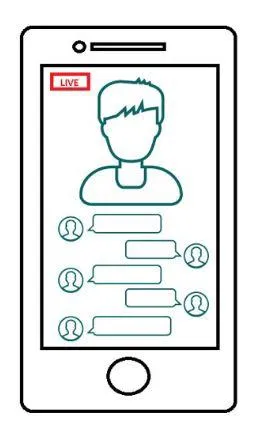
Many social media platforms now have live-streaming as an option. These videos are unedited and are shared without delay. They are unmoderated, unrehearsed and unpredictable, appealing to their creativity. Often a confidence and ego boost, especially if you get a lot of likes.
On some sites viewers can comment, send gifts and talk directly with the person live-streaming.
What does it look like?
Risk factors:
- Developmental stage
- Reduced inhibition online
- Live streaming is ‘in the moment’
- Tactics such as trickery
- Affirmation
- Power of multiple comments
- Fear
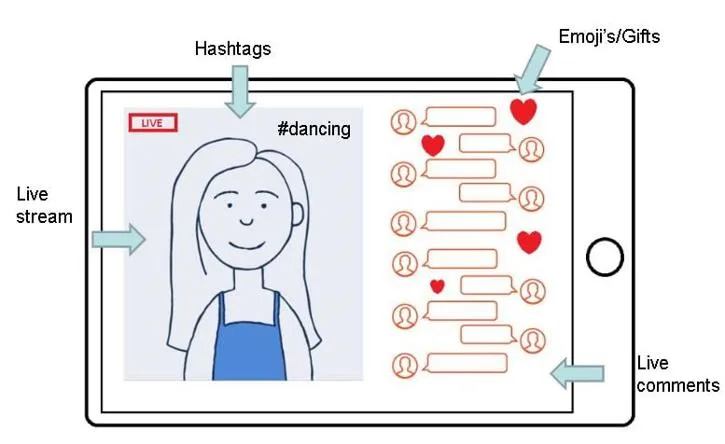
What can you do?
Ongoing conversations with children about their internet use children should only live stream in public rooms. Look out for children moving to private platforms.
Build resilience, particularly where children are feeling lonely, and encourage children to identify safe and trusted adults.
Make sure children know where to go for support
More Support on live-streaming go to What is live-streaming and vlogging? (Internet Matters)
Fake news, and what is an influencer?
False information that is spread online is known as misinformation or disinformation. These are most commonly referred to as ‘fake news’ or ‘hoaxes’.
- Misinformation is where false information is shared by accident without the intent to cause harm. For example, sharing inaccurate photos, quotes or dates online because you believe them to be true
- Disinformation is false information shared deliberately to mislead and cause harm. For example, fabricated news stories and political propaganda.
For more information go to What is fake news and misinformation? (Internet Matters)
Influencers
An Influencers is someone who
- Has the power to affect the purchasing decisions of others because of his or her authority, knowledge, position, or relationship with his or her audience.
- a following in a distinct niche, with whom he or she actively engages. The size of the following depends on the size of his/her topic of the niche.
Influencers in social media are people who have built a reputation for their knowledge and expertise on a specific topic. They make regular posts about that topic on their preferred social media channels and generate large followings of enthusiastic, engaged people who pay close attention to their views. Brands love social media influencers because they can create trends and encourage their followers to buy products they promote.
For more information on influencers go to
- What is an Influencer? - Social Media Influencers Defined [Updated 2023] (influencermarketinghub.com)
- Insight into Influencers (Ineqe Safeguarding Group)
Parental controls
There are four main places you can find parental controls, and it can help to set up a combination of these:
- Internet provider: parents can set up filters to help block access to inappropriate content on any device that connects to their home WiFi
- Mobile operator: filters are often automatically set up on mobile contracts, but parents can double-check with their providers
- Devices: many devices have parental control settings, for example, to help restrict spending in apps or disable location functions
- Online services: sites like BBC iPlayer and YouTube have parental control settings to help restrict access to inappropriate content
For more information go to, Parental Controls and Privacy Settings Guides (Internet Matters)

Remember:
- No parental control is 100% effective
- Be aware also that once parental controls by your internet provider are set up on your WiFi, if a child access 3G or 4G at home, the parental controls can be bypassed.
- If a child goes to their friend’s house where there are no parental controls in place, they will be able to access whatever they want.
- It's also possible to connect to public WiFi when you're out and about, with shops, cafes and restaurants increasingly offering internet access. Look out for the Friendly WiFi symbol which means the content has been filtered.
The National College has produced this free online safety guide to provide parents and carers with the information needed to activate and maintain parental controls on children and young people’s devices.
Download Using and Reviewing Parental Controls (The National College) [PDF]

Gaming guides
National Online Safety.com have created parent and care guides, for some of the most popular online games.
What parents and carers need to know:
For more gaming guides for parents and carers, just register for free with the site NationalOnlineSafety.com
PEGI (Pan European Game Information) game ratings
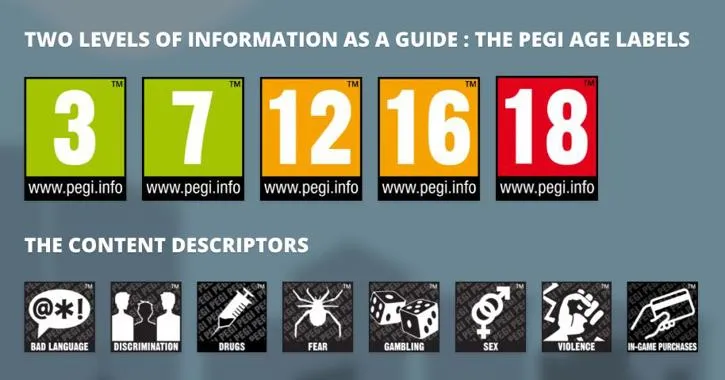
The UK uses the PEGI (Pan European Game Information) system to give games their age ratings. But knowing what exactly each of these ratings mean, and how accurate they are, can be complicated. Games also have content level descriptors, which indicate the suitability of game content for different age groups. These descriptors, often displayed as icons on game packaging, highlight elements like violence, bad language, fear, drugs, and sexual content, providing guidance for parents and players.
To find out more about the ratings and what they mean, visit PEGI levels explained (Pan European Game Information)
Two levels of information are provided as a guide
PEGI age labels show the game is suitable for ages 3, 7, 12, 16, 18.
Content descriptors to show the game contains:
- Bad language
- Discrimination
- Drugs
- Fear
- Gambling
- Sex
- Violence
- In-game purchases
Further support can be found at:
- Gaming Advice Hub (Internet Matters)
- Online Gaming - Resources for Parents (Internet Matters)
- Socialising Online When Gaming (SWGfL)
- ESports and Competitive Gaming (SWGfL)
- Parent Hub (Parents.Ygam)
- Gaming & Mental Health - Parents Guide To Support (YoungMinds)
Parents guide: Talking to your child about online sexual harassment
The Children’s Commissioner
The Children’s Commissioner has published a guide for parents and carers on talking to children and young people about online sexual harassment. The guide includes tips from young people about how parents can open up earlier conversations about sexual harassment, nudes, sexualised bullying, photo editing, body image and peer pressure.
Download Parents Guide: Talking to your child about online sexual harassment [PDF] (Children's Commissioner)
The National Sexual Violence Resource Center (NSVRC)
The National Sexual Violence Resource Center (NSVRC) is the leading nonprofit in providing information and tools to prevent and respond to sexual violence. They have put together guidance on how to talk to children about consent.
Visit 6 Resources to Help Parents Talk to Kids about Consent(NSVRC)
Reporting concerns with the CEOP
If you are worried about online sexual abuse or the way someone has been communicating with your child online, you can report it to one of the CEOP's Child Protection Advisors, go to, Make a Report to CEOP (Child Exploitation and Online Protection Command)
These are the kind of things parents and carers report to CEOP:
- I am worried my child is being groomed online
- My child has shared a nude picture online and is now being threatened
- Someone is asking my child to communicate with them on a live-streaming platform
- My child is meeting up with someone they met online
- I've noticed changes in my child's behaviour which I think may be due to someone they met online
- My child has learning difficulties and I am worried about the people they are talking to online
- I am a foster carer or adoptive parent and I am worried that my child's abusive birth father or mother is trying to contact them online
Sexting, sharing nudes and semi-nudes
Sexting (sex texting) is the act of sending or receiving sexually explicit photos, messages, voicemails, instant messages, videos, snaps etc. via a phone, computer, webcam or other device.
The National College has put together a parents guide that focuses on sexting: the sending, receiving or forwarding explicit messages, images or videos of a sexual nature. It highlights potential risks such as online blackmail, bullying and breaking the law.
Download Safety Tips for parents Sexting [PDF] (The National College)
For more information click on the links below:
- Why language matters: ‘Sexting’ or ‘sharing nudes’? (NSPCC Learning)
- Sharing nudes and semi-nudes: advice for education settings working with children and young people (GOV.UK)
- So You Got Naked Online (SWGfL, Safe, Secure, Online)
Why do young people do this?
There are many reasons why a young person may want to send a naked or semi-naked picture, video or message to someone else.
- joining in because they think that ‘everyone is doing it’
- boosting their self-esteem
- flirting with others and testing their sexual identity
For more information click on the links below:
- Sexting and sending nudes (Childline)
- Sexting and sending nudes (NSPCC)
- Online Safety for Children - Tips & Guides (NSPCC)
- Sexting: what you should know (Internet Matters)
- Help and advice about Sexting (Childnet)
- Talking about difficult topics (NSPCC)
Pornography
It can be difficult to know how to talk to your child about the risks of watching online porn, but these resources, compiled by trusted organisations such as the NSPCC and BT, give you the tools to have those difficult conversations.

NSPCC
Reasons children and young people watch or search for porn online and the risks. Visit Talking to your child about the risks of online Porn (NSPCC)

Children 1st
Tips for helping your child understand pornography. Visit Pornography - Advice for Parents & Carers (Children First)

Resource to help parents and carers talk to their children about pornography on the internet. Visit Resources for parents and carers talk to their children about pornography on the internet (UK Safer Internet Centre)